


Opening DB2 Databases
You can connect DB2 databases in Exportizer using these ways:
- Opening through FD interface. Select FD interface, click DB2, then fill needed database parameters.
- Opening through ODBC DSN. Create (if it does not exist yet) an ODBC DSN of the corresponding type using Windows ODBC Data Source Administrator, and point it to your database. Then select ADO or BDE interface, choose ODBC data source option and then select the needed ODBC DSN from the drop-down list.
- Opening through connection string (interface: ADO). Select Connection string option and write a connection string. Connection string provides a flexible way to open the database because it can include different set of parameters. This way is recommended for advanced users but in most cases connection strings are enough simple even for beginners. Here are basic connection strings (more examples and details can be found in the Internet):
Provider=DB2OLEDB;Network Transport Library=TCPIP;Network Address=xxx.xxx.xxx.xxx;Initial Catalog=MyCatalog;Package Collection=MyPkgCol;Default Schema=mySchema;User ID=myUsername;Password=myPassword; (Microsoft OLE DB Provider for DB2 must be installed)
Provider=IBMDADB2;Database=myDatabase;Hostname=myServerAddress;Protocol=TCPIP;Port=50000;Uid=myUsername;Pwd=myPassword; (IBM OLE DB Provider for DB2 must be installed)
Driver={IBM DB2 ODBC DRIVER};Database=myDbName;Hostname=myServerAddress;Port=myPortNum;Protocol=TCPIP;Uid=myUserName;Pwd=myPwd (IBM DB2 Driver for ODBC must be installed)
Attention
- This database type is supported only in Exportizer Enterprise and Exportizer Pro (the latter one can open such databases via ODBC only).
- DB2 client must be installed. The bit-version of it (32 or 64) must match the bit-version of the application.
- When choosing the ODBC option, please make sure the corresponding ODBC driver installed and the bit-version of it matches the bit-version of the application (32 or 64).
Notes
- Each Exportizer edition has both 32-bit and 64-bit versions. You can install both and use them depending on what type of database you need to work with.
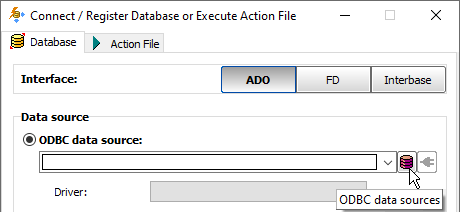
- You can invoke the ODBC Data Source Administrator directly from Exportizer when it was launched in administrator mode:
See also