
- Home
- Products

- Database Software
 Database Tour
 Exportizer
 Reportizer
- File Utilities
 Icons from File
 Rename Us
- Games
 Logical Crossroads
 Free Renju
 Hanoi Towers
- Screen Savers
 Flying Cube
- Download
- Contact
- About Us
- Resources
Database Software

Exportizer - Query and Export Databases
| Version | 10.3.8.2878 |
| Release date | 2026-10-10 |
| Operating System |
Exportizer: Windows Vista/7/8/10/11 Exportizer Pro: Windows 7/8/10/11, .NET 4.52 Exportizer Enterprise: Windows 7/8/10/11, .NET 4.52 |
| GUI Languages | English German French (Anthony Teixeira  ) )Italian Polish Slovenian Turkish (Onur GEVİNOĞLU ) |
| Requirements | See documentation |
Database Reader and SQL Query Tool
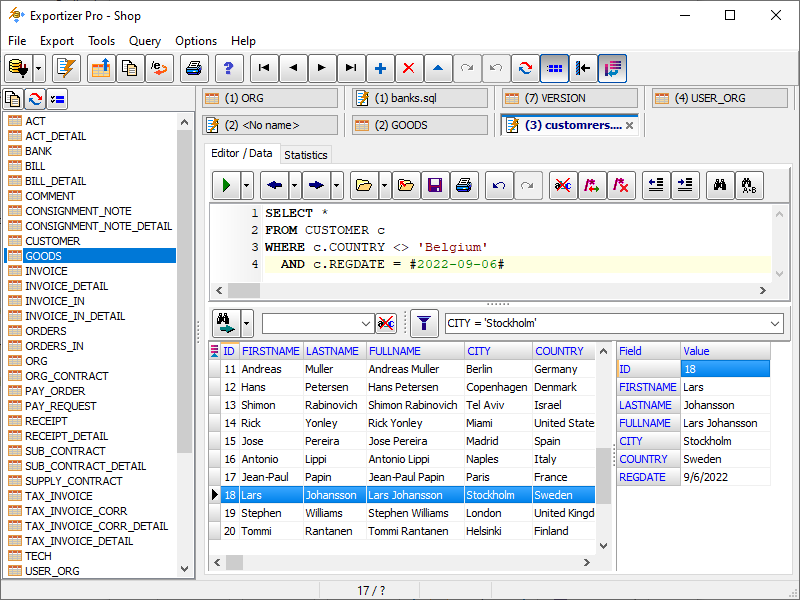
Exportizer is a powerful database export tool designed to help users view, query, edit, and export data from various database formats with ease. Supporting many popular target formats, Exportizer enables seamless data conversion and transfer across database platforms. With advanced features such as batch export, command-line support, and customizable export options, it's an ideal solution for database administrators, analysts, and developers looking to streamline data management tasks. Whether you're working with local or server databases, Exportizer offers reliable performance and flexibility for efficient data export operations.
Exportizer is available in three editions (Exportizer, Exportizer Pro, Exportizer Enterprise), each of which has its own set of functionality.
All editions allow to:
- Browse data, i.e. you can use it as a database reader.
- Edit data. The tool shows data in a grid, where you can change them (if your database is not read-only).
- Export data to files or clipboard.
- Print data.
Additionally, Exportizer Pro allows to write custom SQL queries and export data to ODBC data sources. Executing multi-command SQL scripts is also supported.
And Exportizer Enterprise, besides Exportizer Pro capabilities, exports data to SQLite, Firebird, PostgreSQL, Oracle, SQL Server, and some other types of databases. It also enables multi-dataset exporting and importing in one operation.
Export Your Database to Various Formats
(Every statement below belongs to all three editions, except where explicitly noted otherwise)
Supported data sources:
- File databases like Paradox (.db), dBase (.dbf), FoxPro (.dbf), text, CSV, or XML (with some limitations)
- ODBC data sources [Pro, Enterprise]
- Multi-table files like MS Excel (.xls, .xlsx, .xlsmb, .xlsm), HTML (.html, .htm)
- Multi-table file databases like Visual FoxPro (.dbc), MS Access (.mdb, .accdb), Interbase (.gdb, .ib), Firebird (.fdb), SQLite [Enterprise]
- Databases specified by ADO connection strings [Enterprise]
- Relational server databases like PostgreSQL, DB2, Oracle, SQL Server, MySQL, SQL Anywhere, Informix, Advantage Database Server [Enterprise]
- Windows clipboard
Supported destination data types:
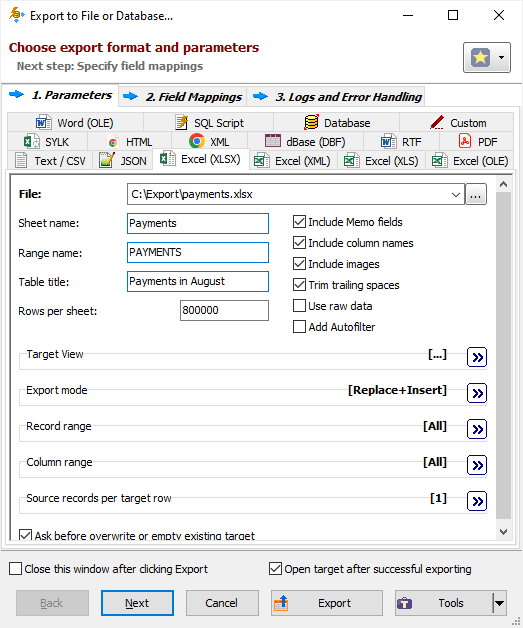
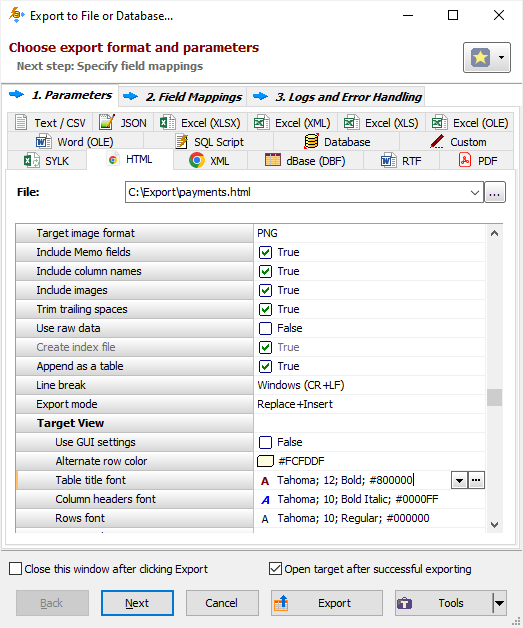
- File formats like text, CSV, JSON, XLS, XLSX, ODS, RTF, XML, HTML, PDF, DBF, SLK, SQL script (with INSERT, UPDATE, MERGE, or DELETE statements)
- User defined file format based on user's formula
- ODBC data sources [Pro, Enterprise]
- Relational databases of any supported source type (see the list above) [Enterprise]
- Files of any types from database BLOB and CLOB columns (see below) [Pro, Enterprise]
For example, in Exportizer, you can export
- dbf to SQL script,
- csv to dbf,
- text to JSON,
- Paradox to Excel,
and make several other data conversions.
Beside that, in Exportizer Pro or Exportizer Enterprise, it is possible to convert
- CSV or Excel to Firebird,
- SQLite to dBase,
- DB2 to Excel,
- Firebird to Interbase,
- Interbase to SQL Server,
- PostgreSQL to DBF,
- FDB to Excel,
- Oracle to DBF,
- Access to HTML,
and much, much more.
After opening the database, you can pick a table (or db view) to export data from. In addition, Exportizer Pro and Exportizer Enterprise have built-in SQL tool, which allows you to export the results of your own SQL queries. » Details...
Convenient Data View
Exportizer shows data in enhanced database grid, which allows to view and manipulate the data in the most convenient way. For example, it is possible to sort data by clicking column header, reorder and resize columns, increase row height to view large text or Blob images, use single record view mode etc.
Additionally, in Exportizer Pro and Exportizer Enterprise, you can customize colors, fonts, and other attributes of the columns for different data sets. Customized colors and fonts can optionally affect the export and print output.
Data Export Options
There is a large number of options you can utilize for different export formats. It can be mappings between the source and destination tables and fields, column and record range, and many format specific options.
It is possible to prepare the data export templates. You can save the often used export configuration to file and then load and reuse it whenever you need the same configuration.
Export procedure can be configured to use detailed record logs, including log of erroneous records. Combined with error handling options, the logs give you the great opportunity to test, control, and debug your exporting process. The format of the logs is customizable. » Details...
Export Multiple Tables
With Exportizer Enterprise, it is possible to export multiple database tables and / or SQL query results during a single export operation.

By default, the tables are exported to destination as one-to-one.

For some destination formats (e.g. HTML, XLSX, or any relational database), it is possible to export several tables to one target file or table. » Details...
Import Data
There are several ways of importing data to a database:
- Open the source database and export data to the database you want to import into. Data importing is the same as database-to-database exporting, but with the source and the destination swapped. [Pro, Enterprise]
- Open the target database and drag the database files from Explorer to the open database. If the dragged files are multi-table databases (e.g. Access or SQLite), then only Exportizer Enterprise can import them; for other types please read the documentation .
- Paste tabular data from the clipboard to an open table.
Export Database Images and Blobs

This tool can automatically detect the most known image types (JPEG, PNG, GIF, BMP, ICO) in BLOB fields and export them, for example, to HTML or PDF. During the export, you can convert BLOB images to another image format. [Pro, Enterprise]
Additionally, it is possible to export multiple BLOB or CLOB data to individual files, binary or text. For images, there is a possibility to change format (e.g. convert bitmaps to PNG, icons to GIF etc.) on the fly. [Pro, Enterprise] » Details...
Using Calculated Fields
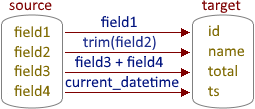
There is an ability to specify the source-to-target field mappings for export session. In the source part of them, you can use either physical fields from the source database or your own calculated fields (i.e. dynamically calculated expressions, or formulas). [Pro, Enterprise] » Details...
For some export formats like HTML or Excel, every exported column can have its own totals. It can be sum, count, average value, some constant text, or any other expression. [Pro, Enterprise]
Export Data from Command Line
Any supported data export operation can be performed either via the application interface or from the command line. Using command line, you can automate your data export operations. The command line mode is also useful for developers, because it allows them to launch Exportizer from their own software.
Another great possibility is using action files. An action file contains a set of command line options to perform export operation. This is a flexible and convenient solution for export automation.
You can easily build basic command lines or action files directly from the GUI. For advanced users, there is a full specification in the documentation .
Both the command line and action file can include environment variables. This allows you to to reuse one command line or action file for different data sources and destinations.
In addition to detailed record logs, in command line and action file processing, you can operate with log of a higher level where main export events are registered.